How CHRISTUS Health rolled out an AI assistant to 51,000 associates
CHRISTUS Health's Jessica Hendrix on deploying an AI assistant to 51,000 healthcare associates: content cleanup, security sign-off, adoption, and results.
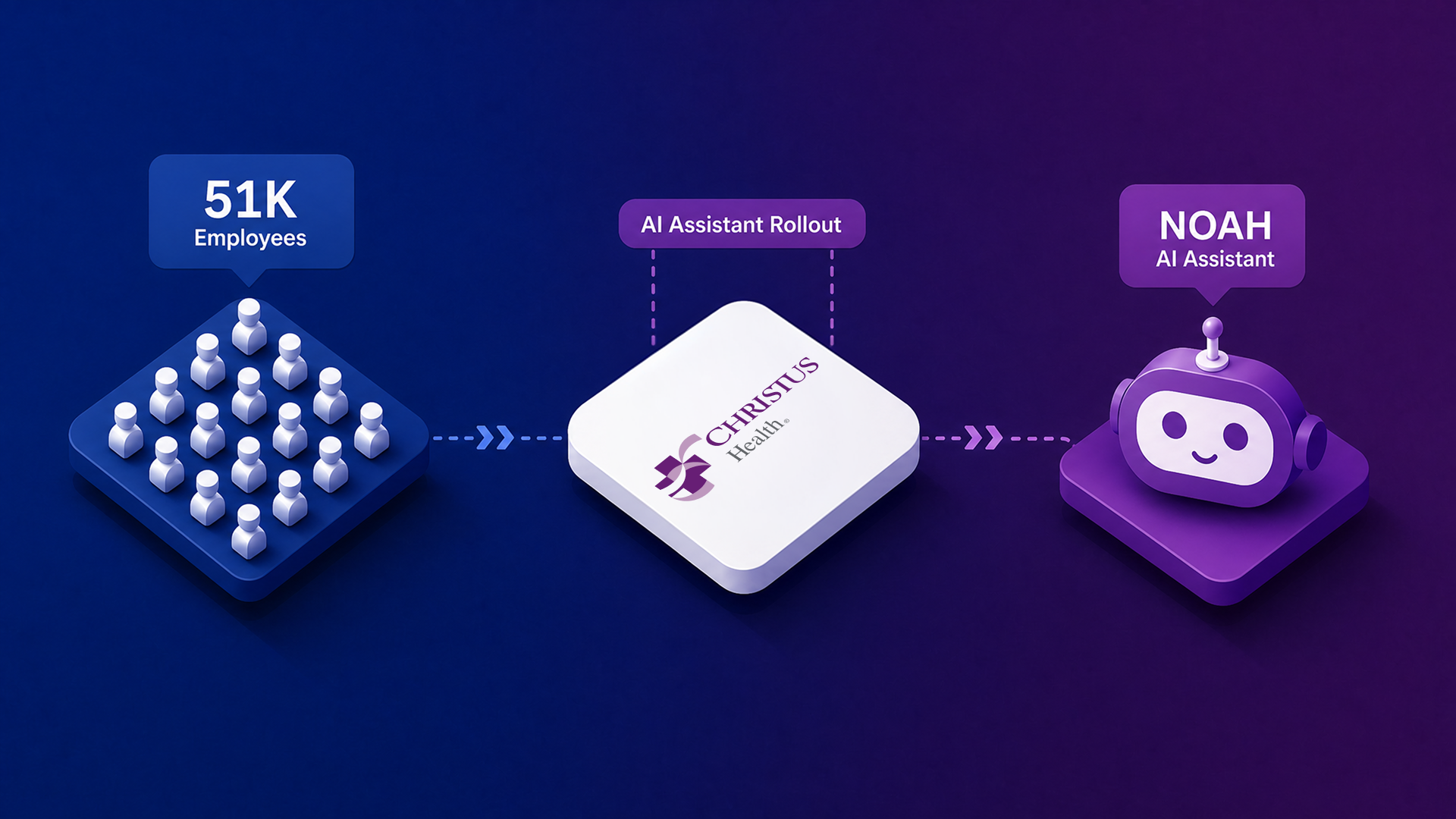
CHRISTUS Health runs 51,000 associates across three U.S. states and three countries in Latin America. Jessica Hendrix works in digital HR and associate experience there, and she came to HR from the data side of the organization. Her first day on the HR team was the kickoff meeting for the project that became NOAH, the internal name for the AI assistant CHRISTUS built with Leena AI.
We sat down with Jessica to walk through the whole journey: what was broken, what she had to fix before a single question could be answered, who pushed back, how she got 51,000 people to try something new, and what she watches to know it is working.
The conversation is below, largely in her words.
The short version
- HR alone was running 149 active applications, inside an organization with roughly 20 major core systems and hundreds more in total. Most were not integrated with each other.
- A single question like “how much PTO do I have” could require pulling from three or four different systems.
- The hardest part was not the technology. It was internal alignment: getting compliance, legal, cybersecurity and every individual application owner to sign off.
- Before go-live, the team had to clean up HR content – duplicate policies, dead links, and no agreed source of truth.
- Adoption came from road shows, humor, and embedding the assistant into new associate orientation, not from a pop-up announcement.
- Jessica’s advice to peers: frame the problem accurately before you pick a solution.
.
What do you have to fix before you can connect an AI assistant to HR content?
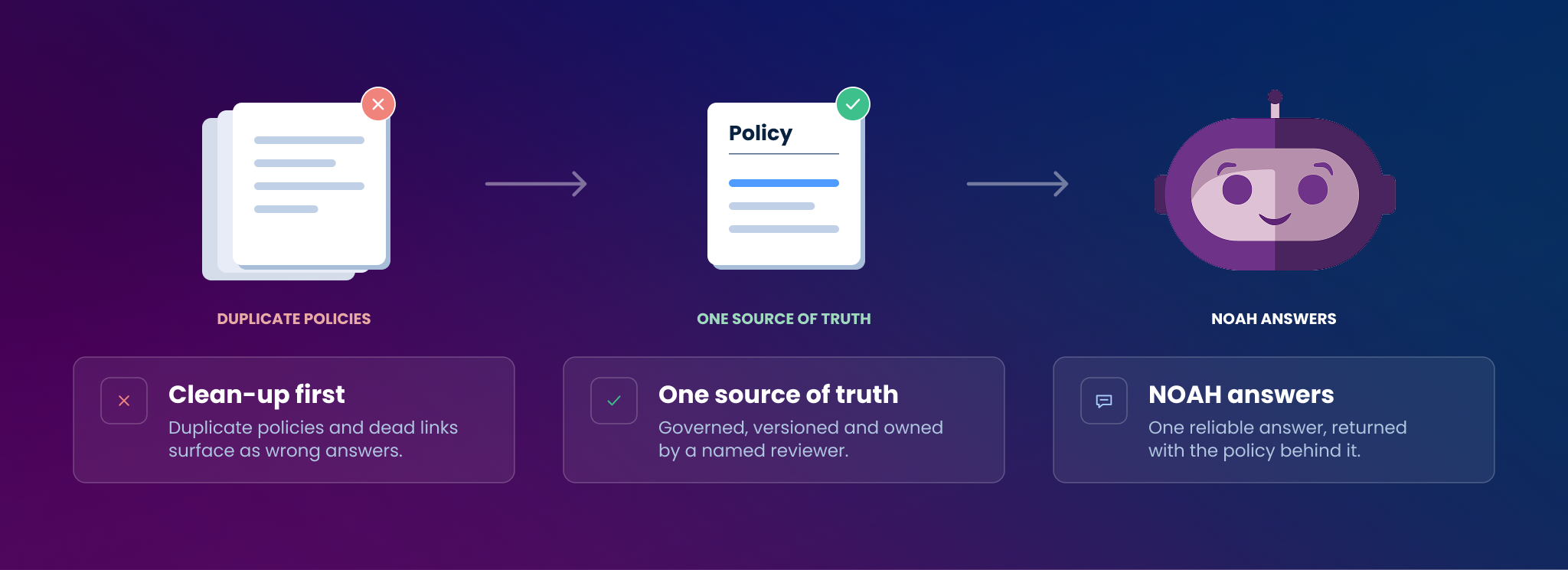
Content governance. Before CHRISTUS could connect the assistant to its policy system, the team had to remove duplicate policies, fix links broken by an SSO migration, and establish a single source of truth for every answer.
Jessica Hendrix: Having come from the data side, I hadn’t been as involved with this idea of content. When we came over to HR and started looking at the source systems we were going to connect Leena to, we realized that some of the primary sources had information in them that actually hadn’t been looked at in a while, or had only been looked at through a certain lens.
A good example is our policy system. We looked at it and saw there were duplicates of different pieces of policy. If you put those into the system, the assistant would come back and tell you: is it option A or option B, which one should we be going with? We had to be able to give a definitive answer of what’s the source of truth, so that you would get a reliable answer when you asked it in the chat.
I was so excited. I thought, this is great, we’re just going to plug it in and go, it’s going to be so easy. What ended up happening was we had to go through with our stakeholders in HR and look through everything to make sure: was this current? Was this the right link? The links had changed over time, we had moved from one SSO application to another, so were all of these links dead now? We had to go through and make sure that everything in there was actually current before we pushed it to production.
And it actually started a bigger conversation for us in HR. Before, we were creating content, but we hadn’t really talked about content governance very much. This started our understanding of the need for content governance, the need for review cycles, and the need to have visibility into content. That’s evolved with our team over the last couple of years. We’ve become much more content focused as a group, and it all started with looking at our information and going, you know what, as things change we want to make sure it’s accurate and updated at the right time, and that we’re giving associates accurate information.
Where this stands today. CHRISTUS did this cleanup manually, ahead of go-live. That gap is now largely closed. Leena AI surfaces duplicate and conflicting answers, flags content that is stale or missing based on what employees are actually asking, and routes it to the right owner to review. Content governance runs as a continuous loop driven by live question data, instead of a clean-up project you have to finish before you can launch.
What does it look like for an employee who can’t find an HR answer?
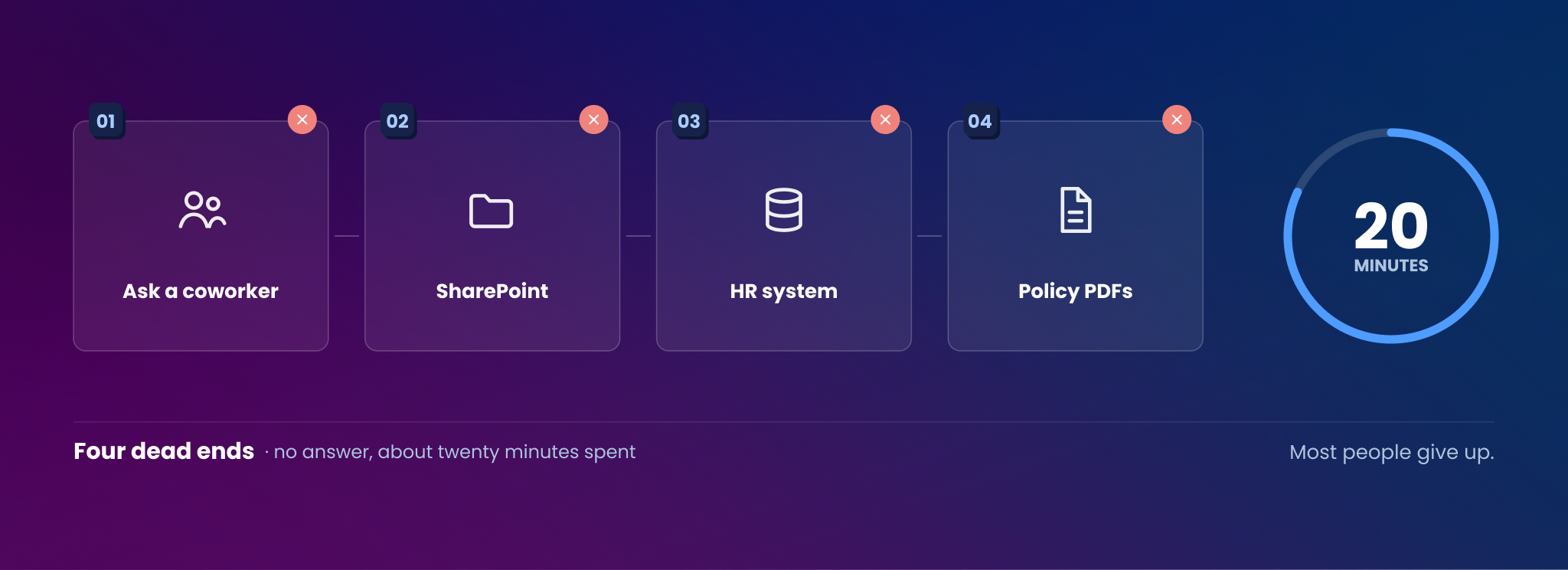
Four dead ends and about twenty minutes, before most people give up. Jessica walks through the night shift nurse, the persona CHRISTUS used in its internal road shows.
Jessica Hendrix: For a nurse working a night shift, if they have a question, they don’t have someone from HR they can ask. Our HRBPs, our day shift workers, our HR call center, they’re open 8 a.m. to 5 p.m. So she’s not going to be able to reach someone in the HR space immediately.
Her first thought is, well, I can’t get hold of someone in HR, so maybe I’ll ask the person next to me. See if they know where to find it or if they know the answer. Okay, they don’t.
So let me go to the SharePoint site and search there. But maybe that area of the SharePoint site doesn’t have the content governed on it. So here’s a policy, but it’s five years old. Is that the most recent policy? Is that still accurate? I don’t know if the information there is necessarily the right information. So she hits a dead end.
Okay, well, maybe I’ll go to the HR system and search there. But the HR system isn’t integrated to the policy system, so she can’t get an answer about a policy there. Another dead end.
So now let’s go to the policy system. But all the policies are held as PDFs, and the search can only search the titles of the policies. So she probably runs into another dead end.
By now she’s spent all this time, all this effort, this stress, this frustration. She’s run into all of these dead ends and she doesn’t have the answer to her question. She’s expended so much energy. At that point most people will either give up, or they’ll try again tomorrow. And you can get stuck in this loop. That was the experience we knew some people were having, and that’s one of the things we wanted to solve for.
How many systems does enterprise HR actually run on?
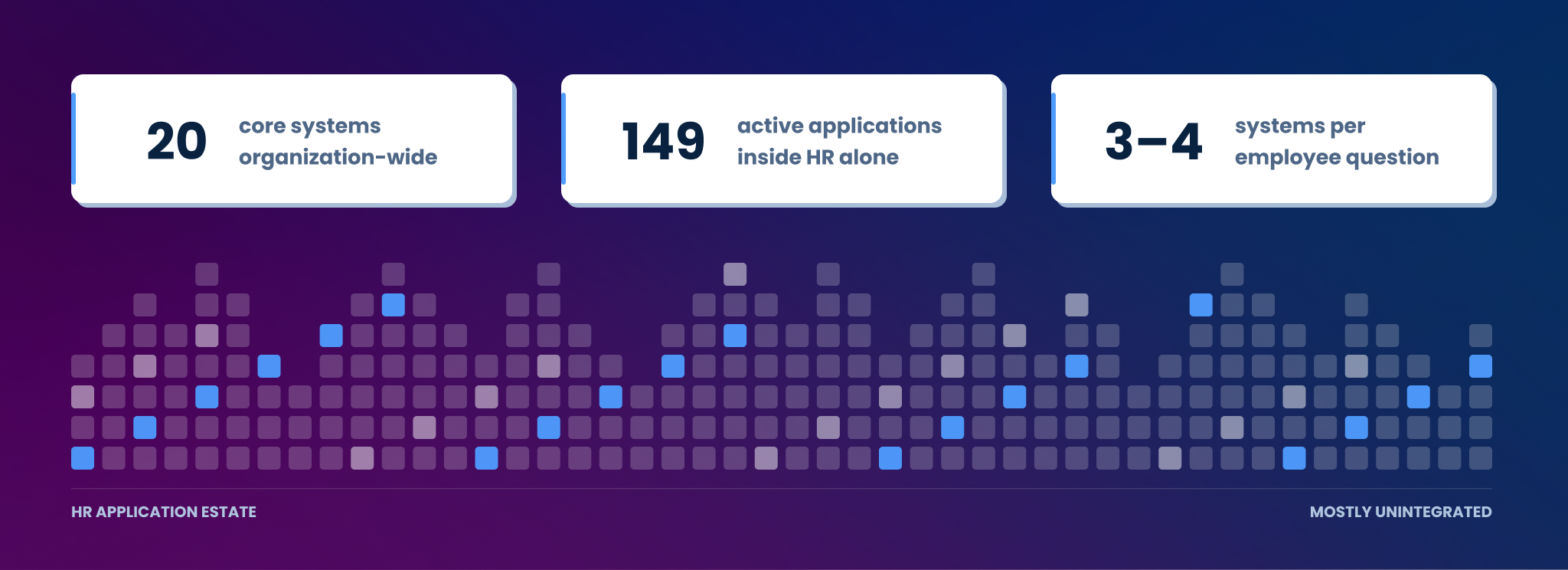
Around 20 major core systems organization-wide, and 149 active applications inside HR alone. Answering one question often meant pulling from three or four of them.
Jessica Hendrix: There are probably about 20 major core systems, but the number of actual applications and systems is in the hundreds, definitely. We created an HR catalog a year or two ago and we had, just within HR, 149 active current applications. Some were associate facing, some weren’t, but all of them had some kind of data in them. And that’s just within HR. If you think about the entire organization, multiply that by every single department, and you get an idea of the scope.
A lot of those systems weren’t integrated with each other. Integration is one of our big focuses as an organization for our 2030 goals, but that takes a lot of time, and we were having a lot of friction points right now that we wanted to solve for.
Associates didn’t have a single entry point where they could go with a question. PTO is a good example. Your associate data is held in one part, your actual paid time off allotment is held in another part, and the policy about when your PTO resets is over here. So there could be three or four different systems that need to have information pulled from them to answer one question. We wanted people to be able to have that information brought to them.
What should you require from an enterprise HR AI assistant?
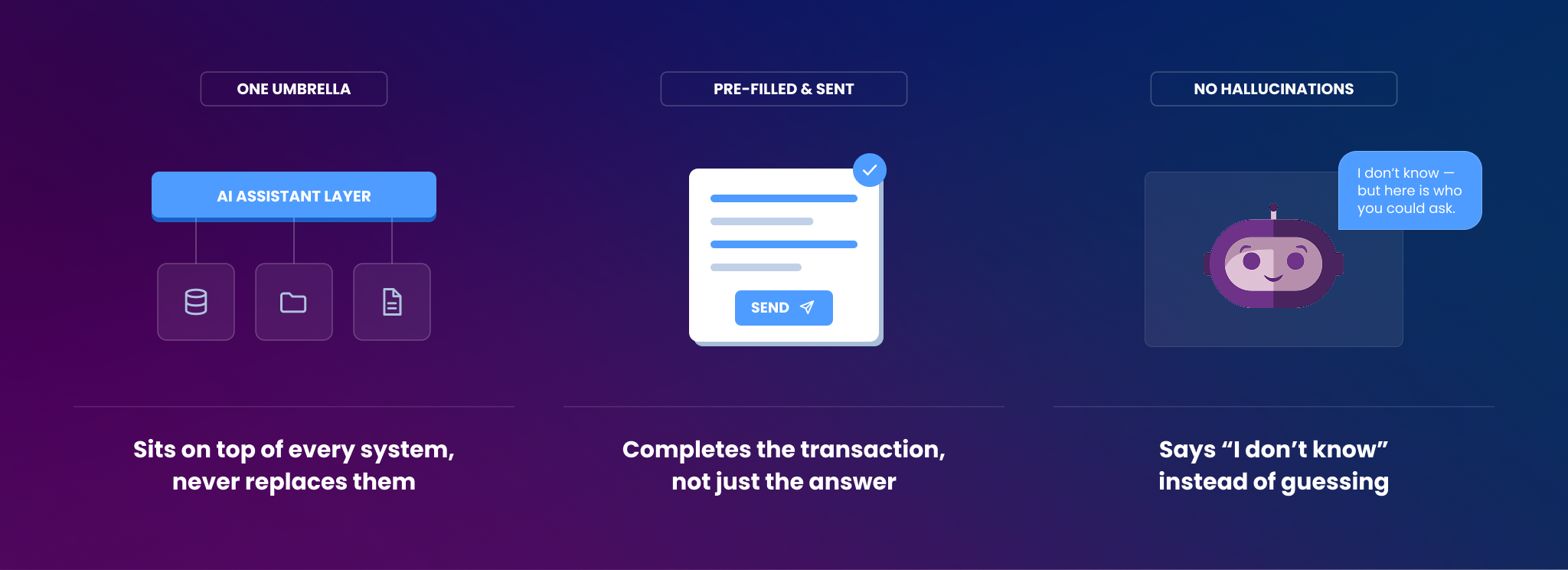
Three must-haves: it has to sit on top of every system rather than replace them, it has to complete transactions and not just return knowledge, and it has to say “I don’t know” instead of hallucinating.
Jessica Hendrix: The biggest thing that was needed was being able to pull information from all the different systems — something that could sit on top of them, as an umbrella over it, and pull information up.
We also knew we needed the ability to have what I call transactional help, as opposed to just knowledge return. Let’s say it’s a request or something you need from the HR team. You have a question and it can give you the answer to the question. But then it can also say, do you need to fill out a form for that? And if you say yes: okay, here, I’ve pre-populated some of these fields for you, double check that looks right, and then you hit send and it submits that for you on the back end. So not just bringing you knowledge and directing you to places, but also helping you accomplish those tasks, so you’re not clicking through and bouncing to different locations. You can move through those activities faster and get back to the rest of your day.
The third thing was making sure there were no hallucinations. That was something we really appreciated about the Leena architecture and the way responses are checked before they’re shared. We really wanted to build trust with our associates, especially because we were doing this project before the whole ChatGPT wave had entered the world. People weren’t as familiar with AI, how it worked, and how it could be used in a way that protected information and gave accurate responses. There was a lot of talk about AI hallucinating. So we wanted something very trustworthy. If there wasn’t a source available, if there wasn’t an answer available, we wanted NOAH to say “I don’t know, but here’s who you could ask,” as opposed to making something up. That was something Leena had to solve for, and one of the reasons we trusted Leena a lot with this project.
Was building it in-house on the table?
No. The internal architecture wasn’t ready, and every technical resource was committed to a five-year EMR consolidation.
Jessica Hendrix: Building it ourselves wasn’t on the table. Some of our IS architecture maybe wasn’t at a place where it could support something like this. But also, our technical resources at the time were highly invested in an enterprise-wide project to get all of our domestic locations on the same EMR system. That was a five-year project from start to finish, and it was massive. All of the resources were going towards that.
So for this, it was something we could partner with IS and with our ERP systems team to accomplish, but the burden of the technical builds and sorting those things, the HR team could partner with the Leena team on. We could keep moving forward even with all those IS resources dedicated elsewhere.
How do you get security and compliance to approve AI in a healthcare organization?
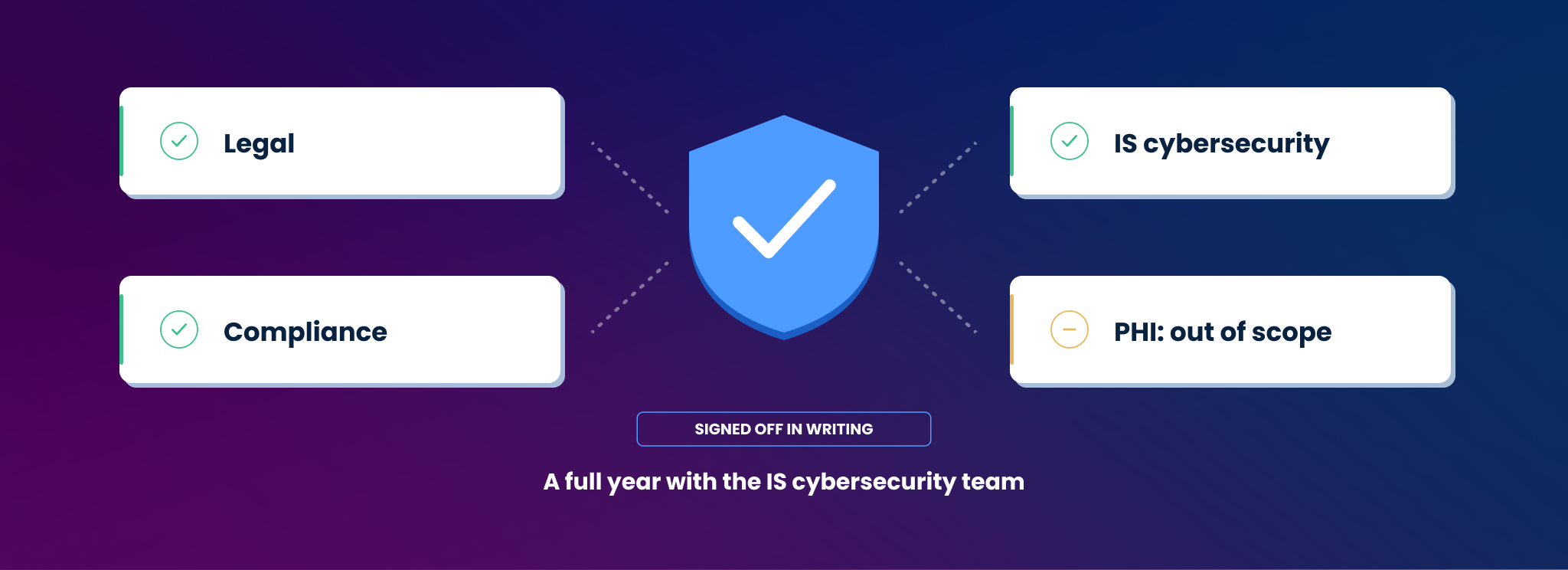
A full year of work with cybersecurity before the project started, a documented sign-off checklist from legal, compliance and IS, and a deliberate decision to keep PHI out of scope at launch.
Jessica Hendrix: I came on after the biggest decisions were made, but I know there was a full year of work that our HR team had done with our IS cybersecurity team to make sure everything was up to snuff, that we had all of the boxes checked. We did a lot of collaborating with them to help make sure the architecture was really well understood.
Having Leena’s proprietary LLM was a big reason the IS team and the cybersecurity team were satisfied. They really liked the idea that this is data that is kept with Leena, it isn’t shared to the outside world, it’s cordoned off. Our data is not used to train the LLM, it’s kept just for us. And again, with hallucinations, there were mechanisms to prevent them. Data security was a really, really big concern.
Then we started small. We agreed we would not be involving any PHI in the system. That may be something we look at again someday in the future. But we tried to find areas where we could negotiate to limit risk, and make sure we were walking together with IS, that we were returning correct answers, and doing it in a way that was appropriate and safe.
What is the hardest part of actually going live?
Internal alignment, one application owner at a time. Jessica carried a sign-off checklist from legal, compliance and cybersecurity into every conversation.
Jessica Hendrix: The internal alignment portion was definitely the toughest. Especially at the start, because not everyone was familiar with AI, we had to go to the stakeholders for each application and make sure they understood all of those things around security, how the data was being stored, that everything was encrypted. We had a checklist that we shared with everybody. We even went to our legal team and made sure they had reviewed everything. So we had the compliance team sign off, we had the legal team sign off, we had IS cybersecurity sign off.
Because I would find I needed to bring that information to every new application owner, and then their leader, and then sometimes their leader’s leader, to make sure everybody understood this was approved, this was safe, and the ways we were intending to use it and the ways we were not intending to use it. There were a lot of questions we had to answer. So it was a slow roll at first, making sure people were on board. But we gained trust over time as they saw those things working as intended. Involving those stakeholders in the UAT process also gave them a level of confidence that things were working as they understood they should. And then we got some momentum going. Building trust with your stakeholders is key. It’s going to be critical.
The other part was the content cleanup. When you’re starting that relationship with a stakeholder, it’s good to start from a position of trust, because what will end up happening is: thank you so much for giving me the access, we’ve got that all set up now, and now I have a couple of questions about some duplicates in your content. It can get a little awkward when we get to that point. So having that relationship established and built already is really important, because you’ll end up partnering with these teams continually to make sure everything is always working as intended and that you’re aligning to their processes as well.
How do you drive adoption of an AI assistant across 51,000 employees?
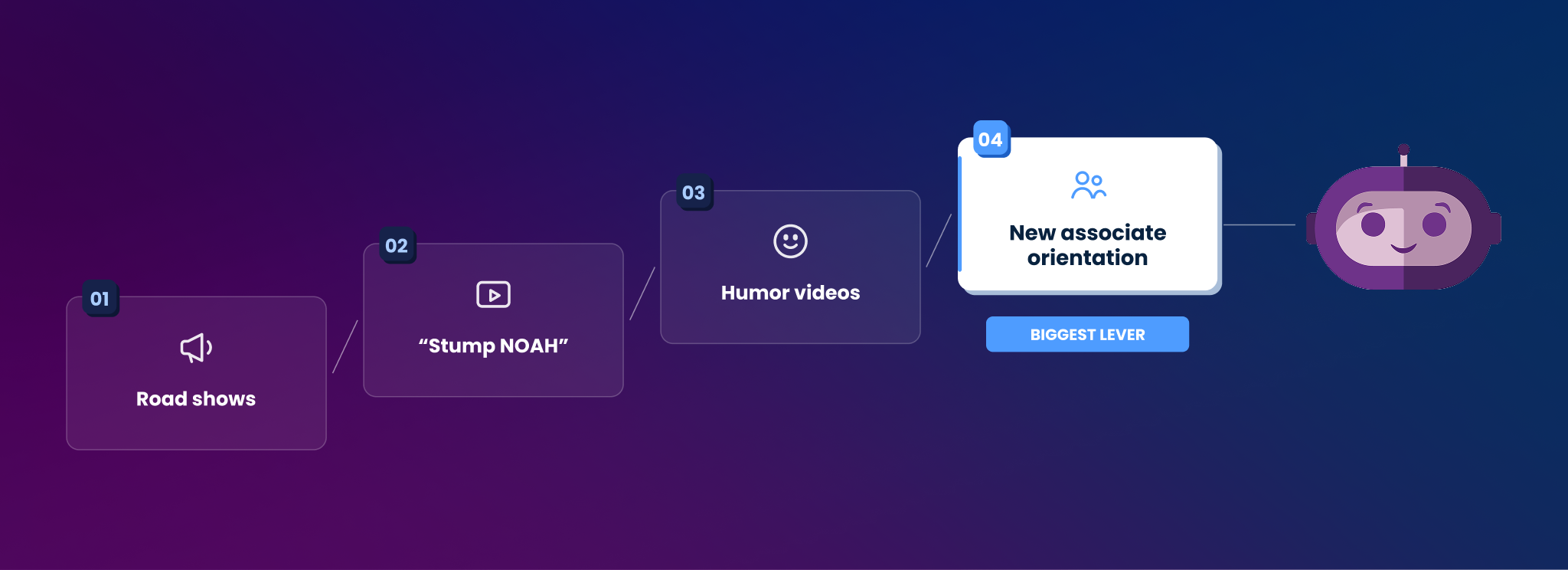
Road shows at every domestic ministry, a “Let’s Stump NOAH” game on iPads, in-house humor videos tied to specific friction points, and — the biggest lever — embedding the assistant into new associate orientation.
Jessica Hendrix: Adoption was maybe more of a surprise for me, because I tend to be in that early adopter group. I actually went through the process of getting change management certified through Prosci during the course of this project, and I think that really helped me understand how adoption is built for digital and for technology.
We found we could put NOAH’s face out there in the technical environment. People would open a web browser or open an application menu and they’d see his face, but they didn’t necessarily know what he did. They were aware of NOAH from a branding standpoint — okay, I know he’s there — but they weren’t sure of the why. Why should I interact with it? Even if we had a pop-up message saying hey, cool new AI tool, they still needed to be sold on the practical application and why it would actually be beneficial.
One of the roadblocks we had to get over was that a lot of people had had experiences with AI chatbots that weren’t necessarily positive, and they were expecting that same kind of experience. So we had to do a lot to change some hearts and minds.
Road shows and “Let’s Stump NOAH”
Jessica Hendrix: We went to every single one of our domestic ministries. We made it look like you would set up a conference — pop-up stands, signage, laptops and iPads so people could actually try it. We played the “Let’s Stump NOAH” game, where we’d ask people to come up, type in their question, and see if they could stump NOAH. Any time we had a chance to present to a group, we’d be there. I was talking about NOAH all day, every day. And we had some fun swag, which helped get awareness out there.
Humor, not announcements
Jessica Hendrix: With the videos, we took an approach of bringing a little bit of humor into it. We wanted NOAH to feel approachable, because that was one of the barriers we sensed early. We’re very lucky to have a multimedia specialist on our team, and he helped us make some great videos from scratch, in our department, pinpointing specific friction points. What’s the exact thing NOAH would solve? Then present it in a funny way and show how NOAH would help in a real life situation. That became something that was easy to share, so we got a little bit of word of mouth going.
The biggest lever: new associate orientation
Jessica Hendrix: One of the biggest things we started about six to nine months ago was working NOAH into our new associate orientation. There was a study done by Atlassian that showed their new associates were adopting at a much higher rate than their existing associates when it came to an AI chatbot like this, where it wasn’t mandatory to use, it was optional.
So in orientation you’d have an explanation during the in-person or online segment: okay, here’s how you fill out a PTO request. You go over here, you open this system, you go here and you click here, you choose this from the menu, you input this, you reference this. And by the time you’re done with that, you’ve forgotten the first thing they said, right? And then NOAH’s face pops up in the video and says, or you could just ask NOAH. I can help you as well.
That de-stresses it a little for that new associate, because they’re the ones with the most questions. Out of any of our associates, our new associates are the ones who need to know where do I go to do this, how do I do this. We want NOAH to be a resource for them, to be a partner that can walk with them through that journey and help them get quick answers, so they can get onboarded fast and feel really confident going through the rest of their day.
What signals tell you an HR AI assistant is actually working?
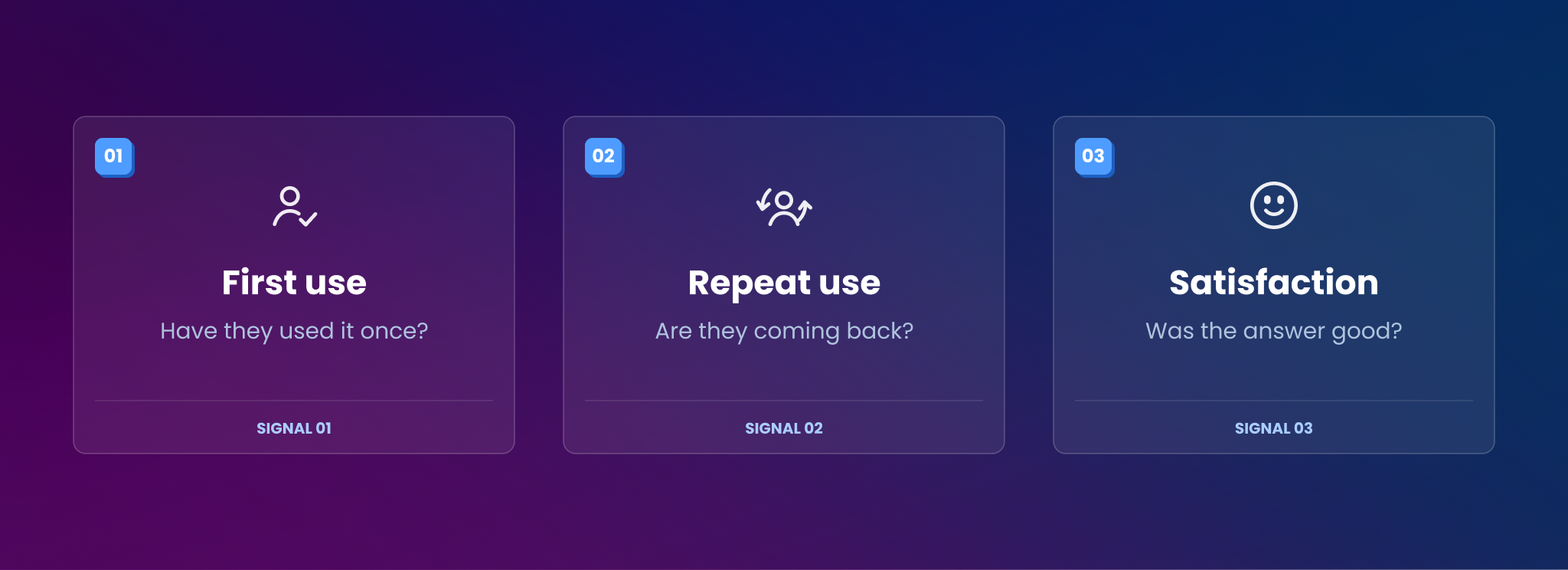
Three, in order: has each associate used it at least once, are they coming back, and are they satisfied with the answer. First use is the barrier that matters most.
Jessica Hendrix: On the Leena dashboard I’m always watching overall associate usage. Have they used NOAH at least once? Because then we’re making sure we’re getting through that first use barrier. Overwhelmingly what we saw was, if someone used it once, they went, oh, this is what it does, and oh, it gave me a really good answer — and they’re kind of shocked. So my big goal is, I just have to get you to trial once, and then you’ll get hooked and come back again.
The second dashboard signal I look at is: are they coming back? For established associates, they may not have a question once a week, but they may have one come up every month or every two months. So are people coming back? We’re trying to see whether NOAH is becoming one of the first things people think of using to answer a question, as opposed to one of the last things. We’re trying to push the use of NOAH closer to the beginning of their journey, because we know it’s going to make it faster for them.
And then one of the bigger signals is associate satisfaction with the response.
“NOAH’s First Kiss”
Jessica Hendrix: There was a woman we met when we were set up in one of the hospitals. She had a question she had been trying to get an answer to for about two weeks. She’d been trying different ways to get it, she wasn’t quite sure who to ask, she was going down all these dead ends. She came up to the booth and we said, go ahead, type your question into the iPad, let’s play Let’s Stump NOAH.
She typed it in and it immediately returned the answer she was looking for. And she just screamed. In the middle of the lobby. She startled everyone. She was so excited that she had finally found what she was looking for. Everybody kind of stopped to figure out what was happening over there with all the purple signage. She was ecstatic, and we were like, oh my gosh, that’s the reaction we would love people to have.
Just the amount of relief that she had something easy to use that could help her like that, and take that weight off her. We actually got a picture. She kissed the iPad. We have it titled “NOAH’s First Kiss.” That’s definitely a memorable one for me, and that’s what I think of first when I think of the associate experience we want to have.
What would you tell a peer at another health system whose leadership just said “do something with AI”?
Frame the problem accurately before you pick a solution and use real internal research, not just industry research, to do it.
Jessica Hendrix: The first thing you want to do is accurately frame the problem. We spent a lot of time and energy with a group we have here at CHRISTUS called the Experience Activators, which our digital associate team started up. It’s a sampling of associates from all different roles and personas across all of the different locations, and we use them as a focus group, a resource we can ask questions of to make sure we’re on the mark.
We did a lot of industry research, but we did a lot of internal research also, to make sure we understood what the friction points were that associates were having, what the problems were that they were having. We took a long time to make sure we were framing the problem accurately, so that when we picked a solution it was actually going to deliver the results we needed.
We identified that it was access and awareness. Those were the two big things we were seeing associates struggle with the most.
Access is: I don’t know which application to use, I don’t know when to use it, I don’t know how to get this piece of information or this piece of data. Where do I go, and when do I do that?
Awareness is being aware of important things you need to do. Having an alert when someone has made a PTO request and you as a manager need to approve it. Or there’s a company-wide pulse survey going on right now and it closes tomorrow, have you taken it yet? Especially for our associates who are not checking emails regularly, which is pretty much all of our clinical staff, our non-desk associates. That awareness component is a real challenge, because a lot of our communications end up being based around email or your direct manager communicating to you, and it’s impossible for a direct manager to tell you everything important you need to know.
And when you frame the problem accurately, you’re also able to get a real idea of your ROI, because you’ve framed a before picture and you know what you’re going to be measuring after. So you’re able to prove the effectiveness of what you’re doing, and you’re getting information back if there’s something you need to adjust. That’s really important for us to know too.
Five things HR leaders can take from the CHRISTUS journey
- Get your content under governance. Duplicate policies and dead links surface as wrong answers the moment an assistant goes live. The cleanup no longer has to block launch, but someone still has to own the review loop.
- Map the dead ends, not the org chart. The night nurse persona did more to justify the project internally than any system diagram.
- Get compliance, legal and security sign-off in writing, once. You will present it dozens of times, to every application owner and their leadership chain.
- Knowledge is not enough. If the assistant can’t complete the transaction, the employee is still bouncing between systems.
- Adoption is a change management project. Road shows, humor, and embedding into onboarding beat announcements every time.
FAQ
What is an AI assistant for HR?
An AI assistant for HR sits on top of an organization’s existing HR, IT and policy systems and gives employees a single place to ask questions and complete requests, instead of searching multiple systems themselves.
What do you need to prepare before deploying an HR AI assistant?
Content governance is the main prerequisite: a single source of truth for each policy, current links, and a review cycle. CHRISTUS had to remove duplicate policies and fix links broken by an SSO migration before going live. Platforms now detect duplicate, conflicting and stale content from live question data, so governance runs as an ongoing loop rather than a manual pre-launch project.
How do you get security approval for AI in healthcare HR?
CHRISTUS spent a year working with its IS cybersecurity team on architecture review, obtained documented sign-off from legal, compliance and cybersecurity, and excluded PHI from the initial scope to limit risk.
How do you drive employee adoption of an AI assistant?
CHRISTUS used in-person road shows at every domestic location, a “Let’s Stump NOAH” demo game, in-house humor videos tied to specific friction points, and embedded the assistant into new associate orientation, where adoption rates are highest.
What metrics show an HR AI assistant is working?
First-time usage across the employee base, repeat usage over time, and employee satisfaction with the responses.
Watch the full conversation

VP Product Marketing & Brand Marketing. Enterprise GTM at AppNexus, HubSpot, and Nextiva. Tarun separates AI's signal from its noise.
Pick your next stop
Hand-picked next reads — short on filler, long on what matters.
 Published 8 September, 2025
The End of the HR Ticket Queue: Why Your Business Needs an AI Voice Assistant for HR Teams Now
 Prashant Sharma
 Published 30 September, 2026
Leena AI named a Pioneer in the Gartner® Emerging Market Quadrant™ for AI Agents in Human Resources
 Tarun Bhatti
 Published 8 September, 2025
From Tickets to Talk: Why AI Voice Assistants Are Your Next Competitive Edge
Prashant Sharma Published 8 September, 2025
The Leader’s Guide to AI SaaS Company Names (2025)
Prashant Sharma Published 19 June, 2025
A People Leader’s Practical Guide to AI in HR
Prashant Sharma Published 28 October, 2026
The first iPhone shipped without a keypad. Why does your AI-native platform ship with an extensive UI?
 Hammad